91.6.1.4 Output Renderer
The Output Renderer tab lists two renderer sections, Render 1 (Playlist) and Render 2 (Mixer), adjustable both for type of stream , video and audio format, and options for rendering separate audio.
For every Renderer section we have:
Renderer - Select the type of renderer (NDI , WebRTC)
Name - Name associated to the process
Video format - Select the format of the video
Audio Format - Select the format of the audio
volume - Set the output volume
Active audio on preview - Enables the user to hear audio from a preview in local workstation
Renderer separate audio - For every checked channel select the audio device that will play the separate audio stream
Where to display the graphics (Playlist / Mixer) - This option is used to choose where to load the graphics, whether on the Playlist or on the Mixer.
This request arose from the fact that initially the graphics and logos were placed only on the output on the Playlist, but if I intend to manage the scene and I have a scene that eg. it only sends me a full screen CAM, I can't view the LOGOS because I have the Mixer in the output, so now you can decide whether to send the graphics and logos either to the Playlist or to the Mixer.If you don't need to manage the scenes with the Etere system, select Playlist, if you need to manage the scenes with the system, select Mixer.
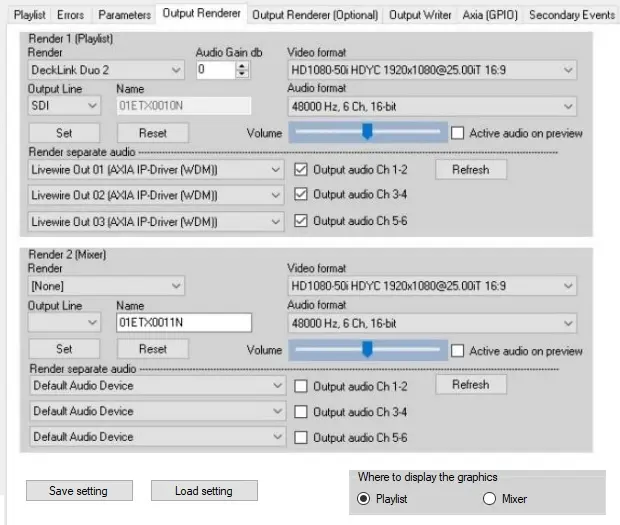 Engine_output_renderer_v2