18.4.6.10 Master control
Engine service is able to manage up to 2 live inputs, defined as A and B, like the automation's master control channel in Etere resources.
They can be configured through the following parameters:
master_control_engine
Use Master control: Activate this option to enable the parameters below and configure the master control feature.
Input A/Input B
Video device: Choose the device to use to receive the input signal.
Video line: Select the channel of the chosen device where the input signal will be received.
Video format: Select the input video format.
Audio device: If audio comes from a different channel, select it here, otherwise choose <From video>.
Audio format: Select the input audio format.
External audio: If connected and installed properly in the server where Radiolive Engine service runs, set an external audio device that will provide audio for the input signal.
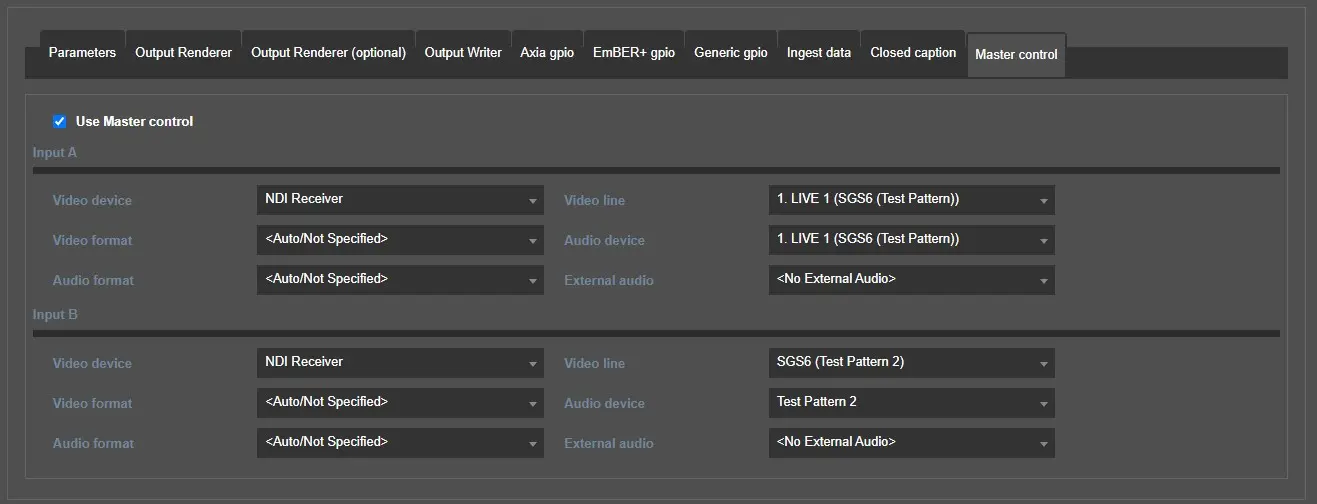 master_control_engine