18.4.6.2 Output renderer
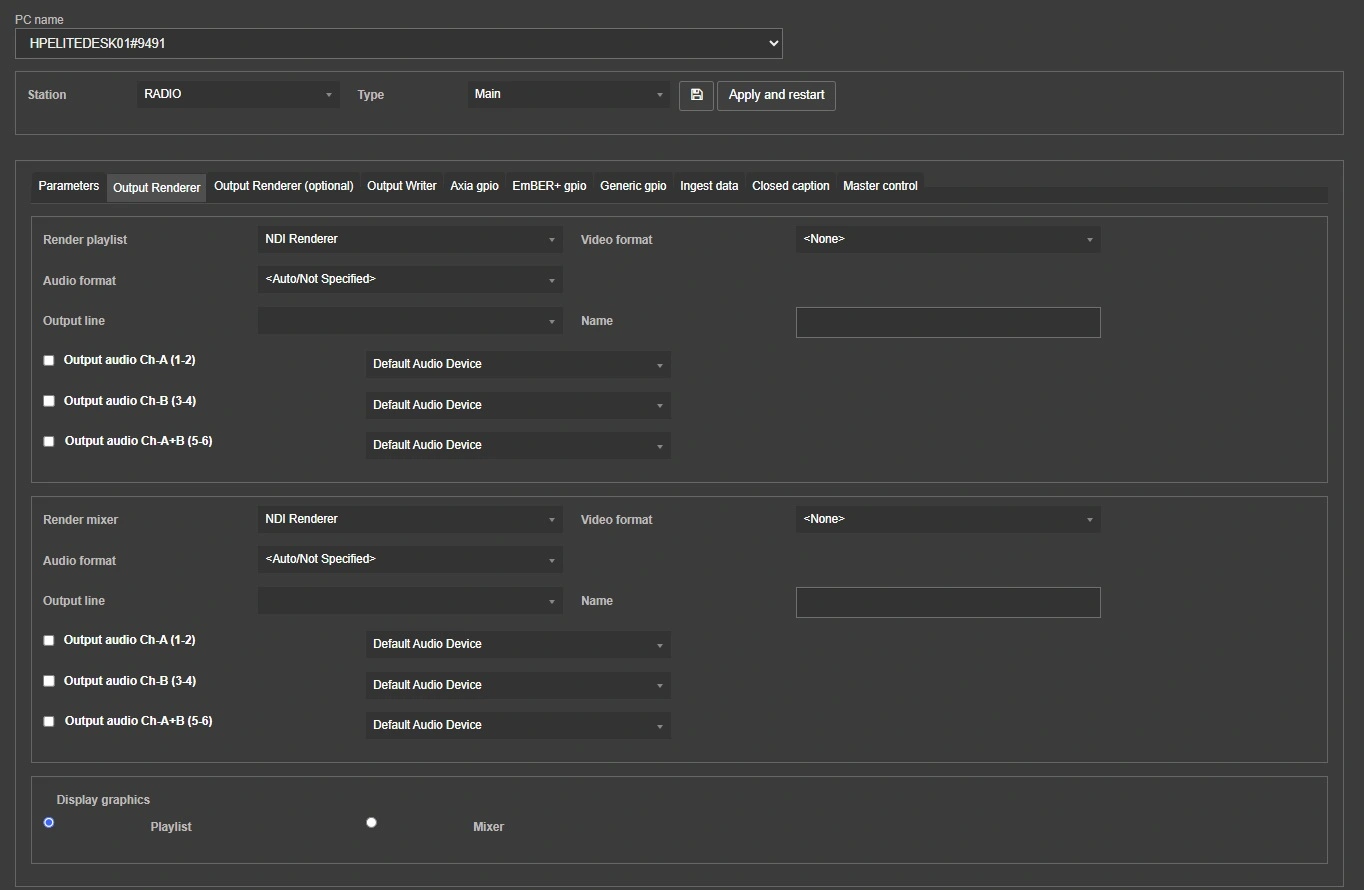
The Output renderer tab allows to set the 2 default renderers of Radio Live Engine: Playlist and Mixer.
Each one has its own section and multiple options for video and audio, described below.
output_renderer
Playlist
Render playlist: Select the device to use for the output signal (e.g.: NDI, SDI channel, WebRTC...).
Video/Audio format: Select the video and audio formats of the outgoing signal.
Output line: If the selected device is an SDI channel, set "SDI" here. This field is disabled in case of an NDI device selected as render.
Name: If the selected device is an NDI channel, set here the name of the NDI signal. This field is disabled in case of an SDI device selected as render.
Output audio Ch-A (1-2/3-4/5-6): For every checked channel select the audio device that will play the separate audio stream.
Mixer
Render playlist: Select the device to use for the output signal (e.g.: NDI, SDI channel, WebRTC...).
Video/Audio format: Select the video and audio formats of the outgoing signal.
Output line: If the selected device is an SDI channel, set "SDI" here. This field is disabled in case of an NDI device selected as render.
Name: If the selected device is an NDI channel, set here the name of the NDI signal. This field is disabled in case of an SDI device selected as render.
Output audio Ch-A (1-2/3-4/5-6): For every checked channel select the audio device that will play the separate audio stream.
Display graphics: Choose on which of the 2 renders, the graphics should be loaded, whether on the Playlist or on the Mixer.
This option has been implemented because initially, graphics and logos were placed only on the output on the Playlist, but if I intend to manage scenes and I have a scene that, for example, only sends a full screen CAM, I can't view the LOGOS because I have the Mixer in the output. Now it's possible to decide whether to send the graphics and scenes, either to the Playlist or to the Mixer.If you don't need to manage the scenes with the Etere system, select Playlist, if you need to manage the scenes with the system, select Mixer.
 output_renderer