59.4.12.2 Process settings
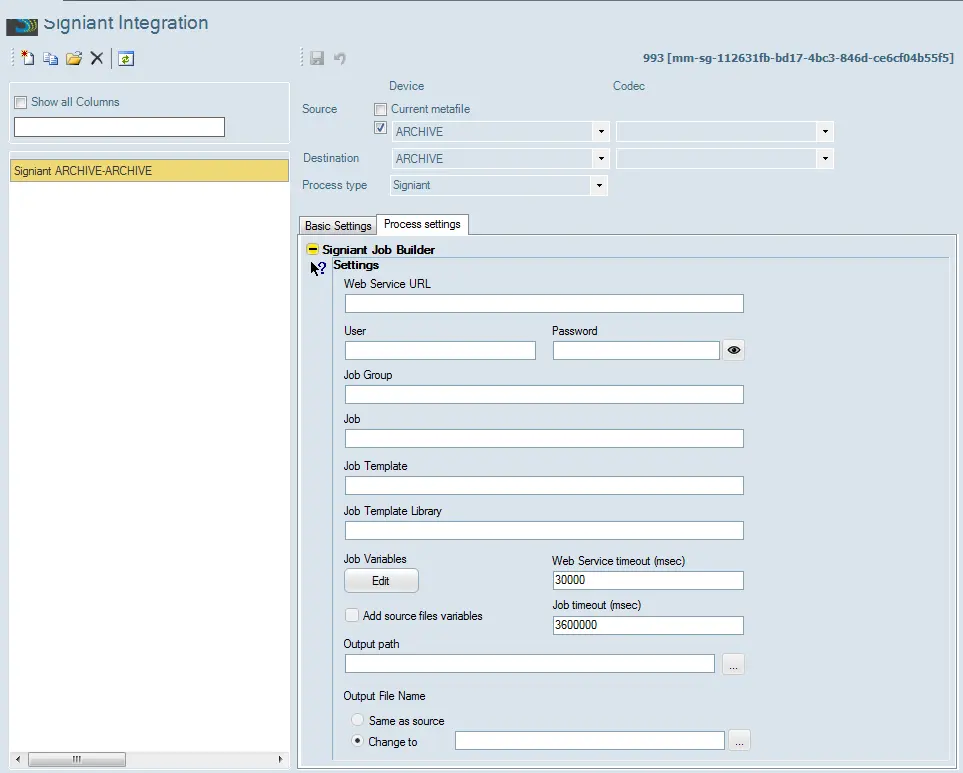
Set here the following parameters to define how the action will be performed: Set here the following parameters to determine how the step will be performed:
Process_settings
Settings
Parameters: Web service URL (mandatory)
Description: URL on which the Signiant web services are available (i.e. where jobs are managed). For instance:
https://SigniantServer/signiant/services
Parameters: User (mandatory if required by ws)
Description: Username for accessing the web service.
Parameters: Password (mandatory if required by ws)
Description: Password for authenticating the username in the web service.
Parameters: Job group (mandatory)
Description: The organisation group under which the job falls.
Parameters: Job (mandatory)
Description: ID of the job the in Signiant system.
NB: Although this field is mandatory, it can be left blank to make the Job ID automatically generated by the DataMover as etere.job=XXX.asset=YYY, where xxx is the ID of the asset and yyy is the ID of the T-workflow job. For instance: etere.job=2435.asset=673
Parameters: Job template
Description: Signiant job template
NB: Leave this parameter empty to run existing jobs.
Parameters: Job template library
Description: Signiant job template library
Parameters: Job variables (optional)
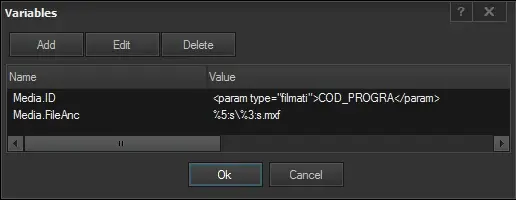
Description: Press the [Edit] button to define an unlimited set of custom variables to be passed to the Signiant web service for carrying out the job. Variables are defined using the Rules Editor (which allows combining database fields and free text):
custom_variables
[Add] - Create and define a new variable
[Edit] - Modify the currently selected variable
[Delete] - Remove the selected variable from the set
Once done, press the [Ok] button to save changes.
Add source file variable:
Enable this option to allow DataMover to add the list of input files as variables in the command file for the Signiant job. This option is useful when moving bundle assets or multiple files from source to destination. Read the options in the "Output File Name" to determine the file allocation.
Parameters: Web Service timeout (msec)
Description: Specify a connection timeout value (in milliseconds) when the Web service is interrupted. The default is 30000 milliseconds, which is 0.5 minutes.
Parameters: Job Timeout (msec)
Description: Specify a timeout value (in milliseconds) for an integration process to remain in the job queue; it would terminate the idle process after the timeout and start the subsequent process in the job queue. The default timeout value is 3600000 milliseconds, which is 1 hour.
Parameters: Output filename (optional)
Description: Select one of the options to determine the output file names:
Same as a source: By enabling the option "Add source files variables" in Job Variables, if this option is enabled, DataMover would add the list of output files to the command file by keeping the file names and changing the output path to the path specified in the configuration. These options work well, particularly moving multiple files from source to destination and retaining the same file names.
Change to: By selecting this option, DataMover would not add the list of files to the command file; it would output to a single file, and the file name would be calculated based on the Rules Editor.
NB: If this field is left blank, a metafile reference will be created featuring the specified codec but no physical file. To completely avoid the creation of a reference to the file in the database, select the "never update DB files" option in the Basic Settings.
Note:
Parameters supported for integrating Etere T-workflow and Signiant are based on the Etere.WF.Signiant.exe executable.
Depending on the success of the operation, the action will return one of the following results:
IDLE - The web service was connected, and the file was found, but the transfer was not yet started.
RUNNING - The web service was connected, the file was found, and the transfer is in progress. The timeout value for this job status is set at 5 minutes.
DONE - The web service was connected, the file was found, and the transfer was completed.
ERROR - The web server was not connected, and the file was not found.
ABORTED - The web server was connected, but the transfer was cancelled.
 Process_settings
 custom_variables