77.2.1.1 Insert Asset Data
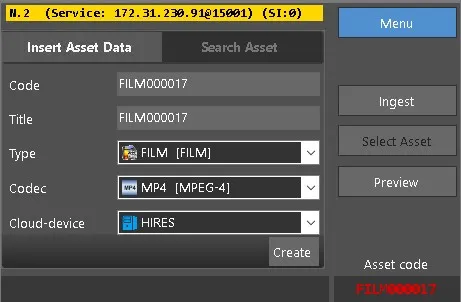
The Insert Asset Data enables you to create a new asset and assign asset type, codec, and destination metal device to the new asset.
Insert Asset Data
•Code: Specify the name of the asset code. If the Code is not specified or does not exist when the [Create] key is pressed, a default code would be assigned following Etere rules. You can change the default code to suit your needs.
•Title: Assign a name as asset title.
•Type: Select an appropriate asset type from the list, e.g., Commercial, News, etc.
•Codec: Select a suitable codec from the list, e.g., H264, MP4, WMV, etc.
•Could-device: Select the destination cloud device where the new asset should be inserted, e.g., Archive, Memory, etc.
NB: When ingest is re-launch, the last used settings in Type, Codec, and Cloud-device parameters would be present.
Click the <Create> button to insert the asset data. If the asset already exists, one of the scenarios would take place:
•If the asset has no metafile, the asset would be created with a warning to alert the user.
•If the asset has one metafile, the user would be prompt to replace the metafile.
•If the asset has more than one metafile, the asset would not be created.
Upon insertion, the video format of the select asset would be displayed for recording reference when you click the <Create> button.
 Insert_Asset_Data_2