18.4.6.5 Axia gpio
Livewire is an audio-over-IP system created by Axia Audio, a division of The Telos Alliance. Its primary purpose is routing and distributing broadcast-quality audio in radio stations.
Most audio these days needs associated control. A delivery system needs a start input at minimum, but could well benefit from a richer control dialogue such as text identifying what is playing that can be sent to the studio mixer and to the HD Radio and RDS encoders. Satellite receivers have control outputs. Telephone systems need dialing, line status, hold, transfer, etc. Even a simple CD player needs ready indication out and start in. Even the simplest source, a microphone, needs to convey on/off status for the air lights. Most conventional controls have been done with primitive GPIO parallel “contact closures.” As a first step, Ethernet can transport GPIO data, reducing and simplifying cabling, and Livewire+ offers this basic capability to replicate traditional start/stop control. But it continues from there; Livewire+ also supports sophisticated remote operation of studio equipment over Ethernet which allows the network to transport much more advanced information than just simple start commands.
Etere’s implementation of AXIA has so far been to meet our customer’s specific needs.
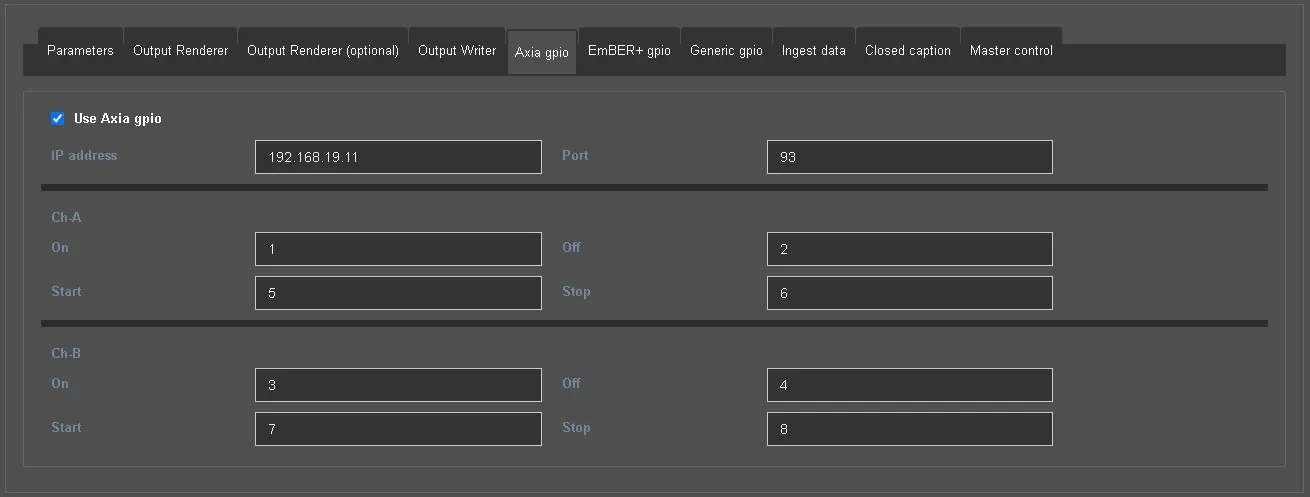
As its old version, Etere Radiolive Engine Service integrates with Axia Livewire system and can be configured through the following parameters:
axia_gpio
Use Axia gpio: Activate this flag to enable the parameters below and configure an Axia gpio device.
IP address and port: Specify the IP address and the communication port of the Axia device which Engine service has to connect to.
Ch-A
On: Type the gpi number to which Engine service should send the trigger to start channel A.
Off: Type the gpi number to which Engine service should send the trigger to stop channel A.
Start: Type from which gpi the Engine receives the signal to start channel A and stop channel B.
Stop: Type from which gpi the Engine receives the signal to stop channel A.
Ch-B
On: Type the gpi number to which Engine service should send the trigger to start channel B.
Off: Type the gpi number to which Engine service should send the trigger to stop channel B.
Start: Type from which gpi the Engine receives the signal to start channel B and stop channel A.
Stop: Type from which gpi the Engine receives the signal to stop channel B.
 axia_gpio