91.6.1.9 Generic GPIO
This tab allows Radio Live Engine to send and receive commands through a generic GPI device, such as the Advantech BIODAQ USB-4750 or USB-4761.
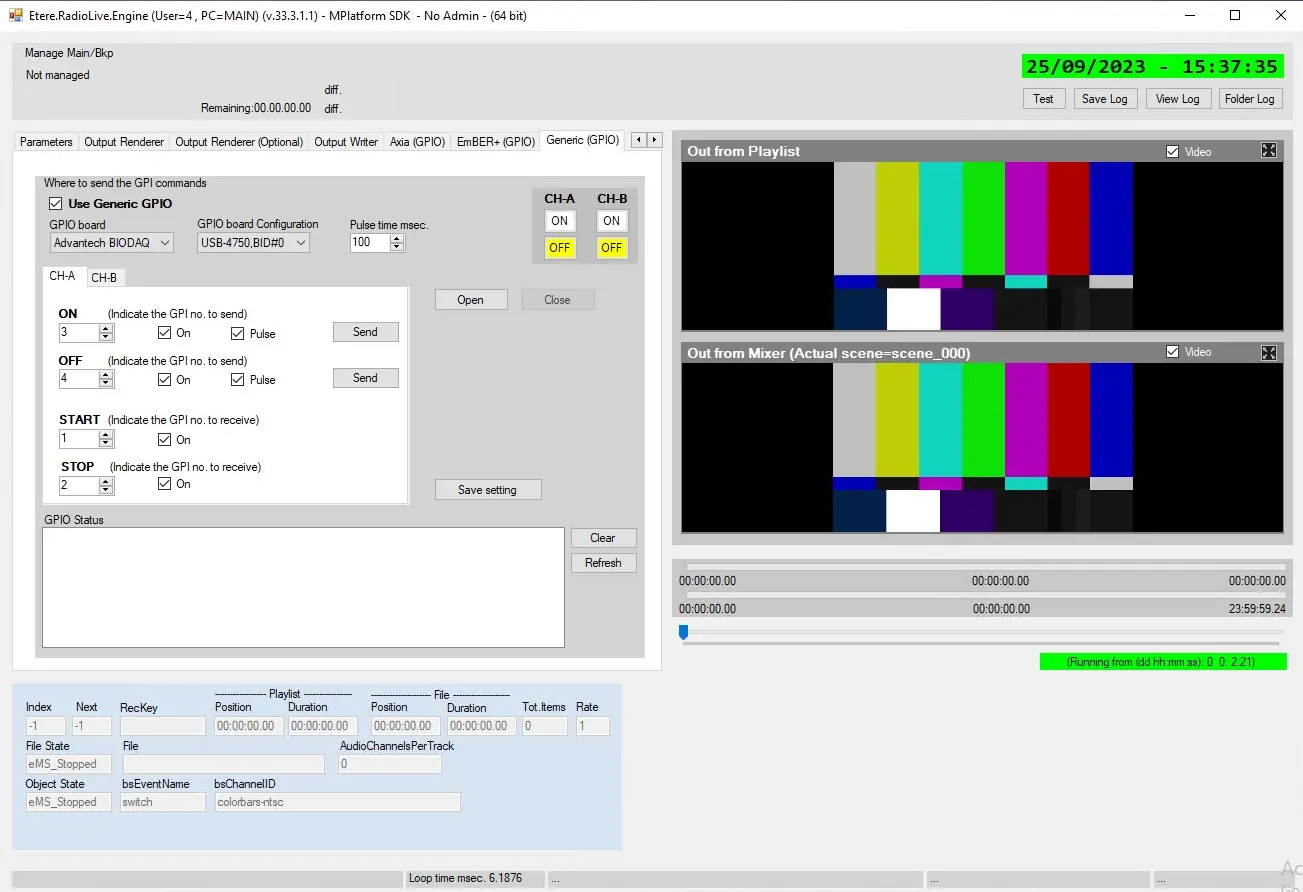
generic_gpio
Use Generic GPIO: Enable this flag to use an Advantech BIODAQ GPI device to control the playlist.
GPIO board: Select the GPIO device to use.
GPIO board configuration: Select the device model.
Pulse time msec.: Set the duration of the pulse to activate a GPI.
Open/Close: Use these buttons to open and close the communication with the selected GPIO board.
Channel-A and Channel-B
These 2 tabs allow to set the GPI numbers for each command to send and receive. They contains the same parameters but each tab refer to a different channel.
"On" flags must be enabled to send the following commands.
ON command
This is the command that Engine SENDS to start the next event on the related channel. Indicate which is the GPI number to use to send the signal. During the playlist skip, this command is followed by an OFF command for the opposite channel.
E.g.: If the currently playing event is on Channel A, when Engine send ON_CH_B to skip to the next event, it also sends OFF_CH_A right after.
Pulse: If this flag is not active, the pulse to activate the GPI will be continuous and the GPI will be always on. Otherwise, the GPI will be kept on for the duration set in Pulse time msec. parameter.
Use the [Send] button to send manually this command.
OFF command
This is the command that Engine SENDS to stop the current event on the related channel. Indicate which is the GPI number to use to send the signal. During the playlist skip, this command is preceded by an ON command for the opposite channel.
E.g.: If the currently playing event is on Channel A, when Engine send ON_CH_B to skip to the next event, it also sends OFF_CH_A right after.
Pulse: If this flag is not active, the pulse to activate the GPI will be continuous and the GPI will be always on. Otherwise, the GPI will be kept on for the duration set in Pulse time msec. parameter.
Use the [Send] button to test manually this command.
START command
This is the command that Engine RECEIVES from the GPI board to trigger the ON command and start the next event on the related channel. Indicate which is the GPI number to use to send the signal.
If the playing event is on channel A, a START command given on channel B will skip the playlist to the next event by triggering the ON command on channel B and the OFF command on channel A.
Instead, if the playing event is on channel A and a START command is given on channel A, no operation will be done.
STOP command
This is the command that Engine RECEIVES from the GPI board to pause the playlist on the related channel. Indicate which is the GPI number to use to send the signal.
Once the above parameters have been set, click on [Save setting] to save the configuration and reload it at the next restart of Radio Live Engine.
GPIO Status
This space shows the list of commands sent and received, as well as its time and the GPI number activated or deactivated.
This list automatically position itself on the last message displayed.
Clear: Deletes everything in the list.
Refresh: Refreshes the list with the new commands not displayed yet.
 generic_gpio