59.4.7.11 MD5 Checksum
The MD5 Checksum allows creating actions to generate and verify the security file hash of media files associated with assets. Adding an MD5 Checksum on a T-workflow will make that every time a video file is moved from one device to another, and MD5 Checksum will be generated to protect the reliability of the transferred media against modifications substitutions or corruptions.
The MD5 Checksum is one of the most common signature methods used to, for example, make sure that a file that you have moved is not corrupt or has not been modified; this, thanks to a generated string (based on an MD5 algorithm) that combines the most relevant file's attributes.
Refer to "Best Workflow Practices" while using MD5 Checksum in T-workflow action.
Note 1: Please note that the MD5 checksum actions can be performed only for files stored on path-based metadevices (e.g. disk volumes). Using this action against files stored in video servers (e.g. MTX, Omneon) is not supported.
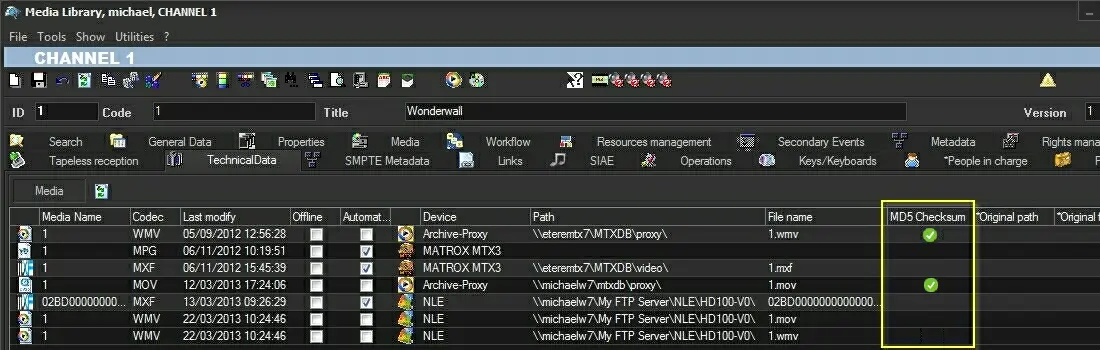
Note 2: The existence of an md5 checksum is displayed in the "Media Library > Technical data" for each asset file; a status icon indicates if the file's md5 hash checksum is either correct or not. It's worth mentioning that when an asset file is removed, its md5 hash checksum is also removed along with it.
It is not possible to remove the MD5 checksum from the asset without deleting the asset. However, you can overwrite the existing MD5 checksum by creating a new checksum on the asset. For creating a new checksum on assets in LTO tape, the assets must be restored to disk to create a new checksum.
Note 3: Every time DataMover transfers a file with an MD5 checksum, the existing checksum is also copied along with the file into the target metafile.
Note 4: It is not recommended to copy the zipped files containing MD5 checksum files from source to destination folder; it could result in discrepancies in checksum value when files are uncompressed at the destination folder. Zip archive has its checksum different from the MD5 checksum.
Configuring the action
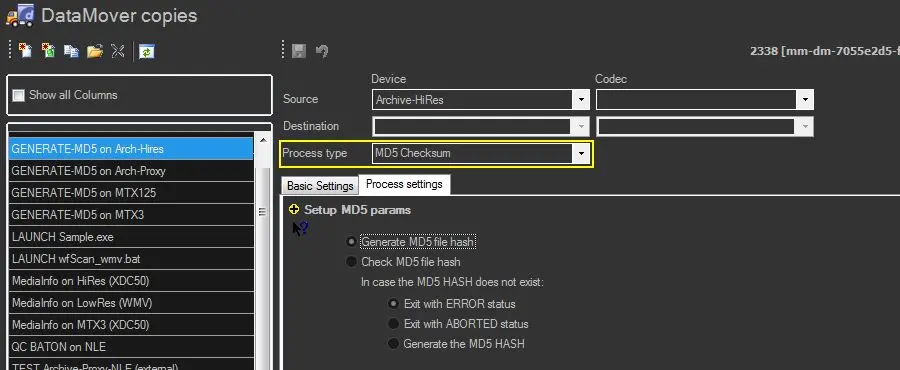
To create an MD5 Checksum action, the following parameters need to be set:
MD5_Checksum
Generate MD5 file hash - Calculate the MD5 file hash of a media file and store it in the database.
Use it, for example, when archiving files on HSM (see HSM Archive, HSM Archive LTFS).
Check MD5 file hash - Calculates the MD5 file hash of a media file and compares this value to the one stored in the database for either the currently processing file or any other file associated with the same asset.
Use it, for example, when restoring files from HSM (see HSM Restore, HSM Mount LTFS).
In case the MD5 HASH does not exist - Specify the behaviour in case the MD5 hash is missing¹ for a metafile:
Exit with ERROR status (default) - exit the action with the "error" status
Exit with ABORTED status - Exit the action with "aborted" status (e.g. to take a different action during the T-workflow)
Generate the MD5 HASH - Generate a new MD5 hash for the metafile.
¹The MD5 hash is considered missing when at least one of the metafile files has an MD5 hash that is "null".
How to use it
Once [saved], MD5 Checksum actions will be available as action blocks ready to be included within T-workflows:
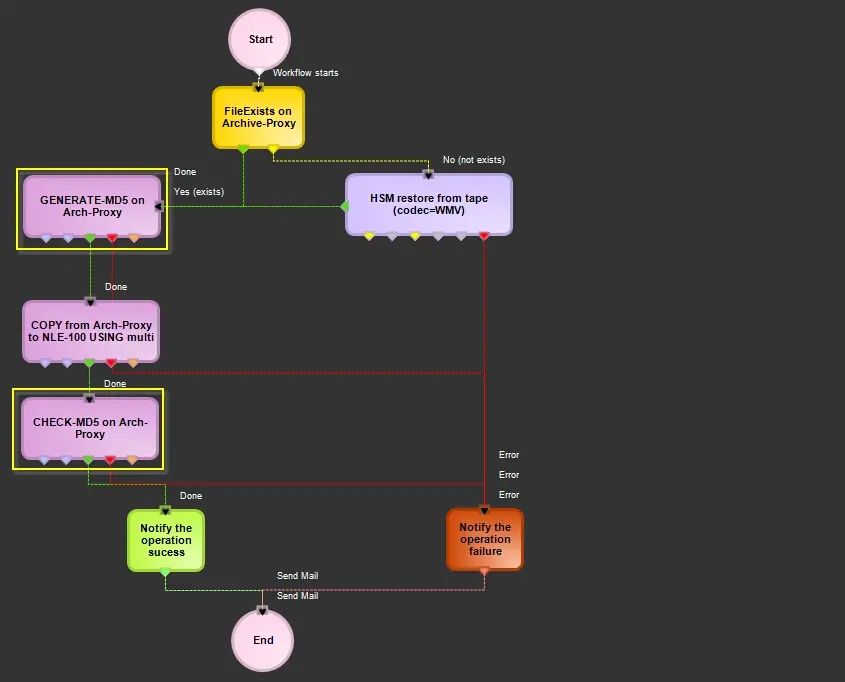
1. Add the MD5 generation/check action block to a T-workflow (e.g. copy from one metadevice to another):
copy_from_one_metadevice_to_another
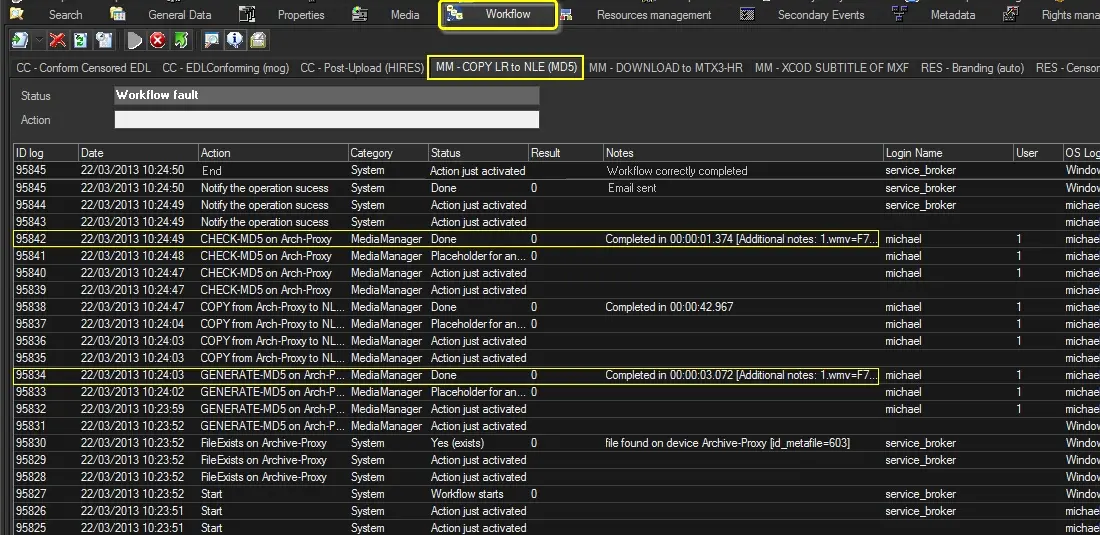
2. Launch the Media Library, open an asset and attach to it the just created T-workflow; Etere Data Mover will process the MD5 generation and check actions:
MD5_generation_and_check_actions
3. Still in the Media Library, under the "Technical data" tab, it will be possible to consult the MD5 checksum of media files:
MD5_checksum_of_media_files
The possible MD5 Checksum results are listed below:
Green icon - The MD5 Checksum hash value has been calculated and stored but is still present in the file.
Green icon - The MD5 Checksum hash value was calculated and matched the stored value.
Red icon - The MD5 Checksum hash value does not match the stored. The archived file might have been corrupted.
 MD5_Checksum
 copy_from_one_metadevice_to_another
 MD5_generation_and_check_actions
 MD5_checksum_of_media_files