59.4.7.8 For Import Subtitle
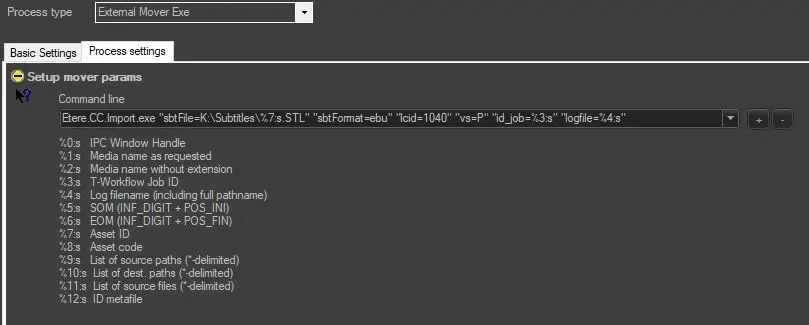
To import subtitles in Data Mover with External Mover Exe, you need to create a copy action in Data Mover to include the following parameters in the command line:
External_Mover
sbtFile: subtitle filename (including full path and extension). You can use %7:s to generate the file name by Asset ID, %8:s to generate the file name by Asset Code, or %1:s if a Media name is already assigned to the asset.
sbtFormat: it can contain one of the following values:
• EBU (EBU Subtitling format)
• SAMI (Microsoft SAMI format)
• PlainText (Plain text)
• WMF (Windows Media format)
• StructuredTitles (Structured Titles)
• RhozetXmlTitler (Rhozet XML Titler)
• CavenaTxt (Cavena Txt)
• SoftniSub (Softni SUB)
• PAC (PAC Screen Systems format)
• DaaiTxt (DAAI TV Txt)
• PlayboxSub (Playbox Sub)
• SCC (Scenarist Closed Captions)
lcid: Language code (run SQL query to list all available languages: select lcid, alias from dbo. languages)
vs: Video standard. This parameter can be omitted by default. It can contain the following values:
• P (PAL)
• L (PAL Leap Frame)
• N (NTSC Not Drop Frame)
• D (NTSC Drop Frame)
• M (PAL (M))
• Q (HD 50P (50 FPS))
• F (HD 60P (60 FPS))
• E (HD 60PM (59.94 FPS))
• T (Telecine (24 FPS))
• S (Telecine (23.97 FPS))
id_job: The T-workflow job ID retrieved automatically by datamover.
logfile: Log file name (including full pathname).
 External_Mover