59.7.1.4 Create Custom NDI Output Channel
In the Etere IP router, you can configure an In/Out channel to the non-Etere NDI stream to cater for specific needs.
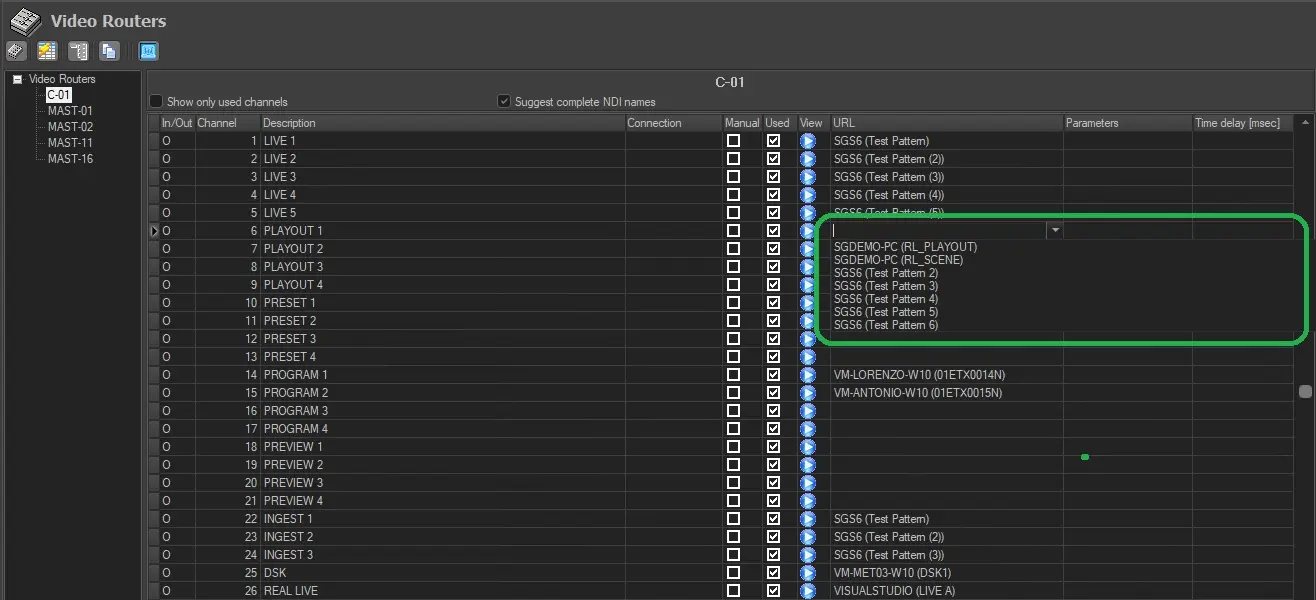
From the "URL" column, click the drop-down button to view all available NDI streams running on the network and select a custom NDI stream for the In/Out channel. After selection, the NDI stream URL will automatically populate if empty in the Channel Description column. Otherwise, you can put the description you want. In both cases, Description=Url or Description≠URL, the NDI stream will be available to use inside the Etere System.
NB:
For easy identification, you can assign the NDI stream name as "machine name (stream name)", e.g. TESTMAX1(01ETX0041N), TESTETX1(Test Pattern), etc.
If there are multiple NDI streams with the same name, the NDI streams would be displayed in running numbers in brackets, e.g. TESTETX1(Test Pattern), TESTETX1(Test Pattern (2)), TESTETX1(Test Pattern (3)), etc.
You can set a given delay (in msec) to the streaming process in the Time delay column. This column is only visible when configuring an IP Router.
Etere Router IP
 Etere_Router_IP_NDI