91.6.1.3 Parameters
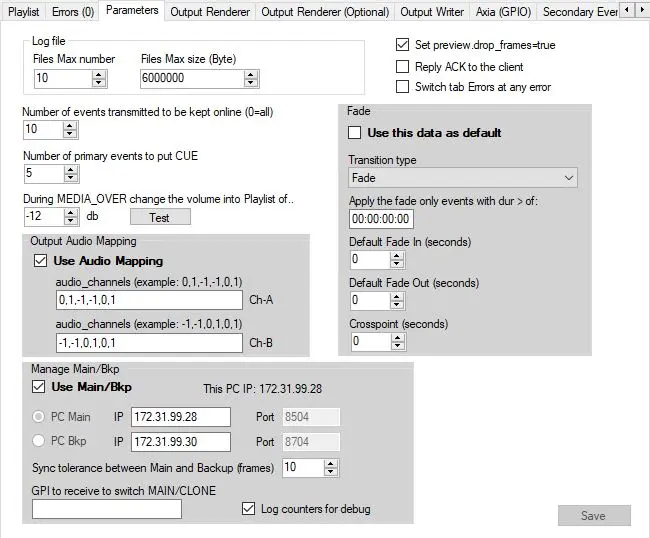
In this tab are listed options and parameters regarding log files, Fade , Output Audio Mapping, Main/Bkp options and general parameters. Once set, press "Save" button.
Log file: select the the number of max files you want generated as logs (Files Max number) and their dimension (Files Max size (byte)
Fade:
Use this data as default: Enable/disable this parameters section
transition type: Select the type of fade to apply
Apply the fade only events with dur > of: set the minimum threshold to reach, for which the fade will apply
Default Fade In (seconds): Set duration of Fade In
Default Fade out (seconds): Set duration of Fade Out
Crosspoint (seconds): Set duration of Crosspoint
Output Audio Mapping:
Use Audio Mapping: Enable/disable this parameters section
For audio configurations Ch-A and Ch-B, define the audio channels used in audio mapping as per example.
Manage Main/Bkp
Use Main/Bkp: Indicate if the Radio Live system is composed by a single playout running as MAIN (disabled) or by two playouts identified as MAIN and BACKUP (enabled). If enabled it allows to set the parameters to recognize the main and the bkp PC.
This PC IP: Auto detects and shows the IP address of the workstation
PC Main: Set the IP address of the workstation dedicated as MAIN (Port value is standard)
PC Bkp: Set the IP address of the workstation dedicated as BACKUP (Port value is standard)
Sync tolerance between Main and Backup (frames): Set the minimum difference tolerated of frames between MAIN and CLONE engines. If this threshold is crossed the BACKUP will realign with the MAIN.
GPI to receive to switch MAIN/CLONE: Set the gpi dedicated to the switch MAIN/CLONE (based on the system owned, an Axia, Ember+, or Analogic GPIO can be set and dedicated to make the transition from main to clone)
If this section is enabled, in the upper part of the Radio Live Engine window will appear the status and the role of the application
manage_main_bkp_mainpc
PC: It indicates the role of the Engine at the startup (set in the shortcut's target field as "C:\Program Files (x86)\Etere\Etere.RadioLive.Engine.exe" [station number] ["MAIN" or "BKP"])
OnAir: It indicates the current role of the engine. It can be MAIN or CLONE and according to it, more information is shown, as described below.
Switch to MAIN\CLONE: Switches the role of the engine from MAIN to BKP or viceversa.
If the Engine's role is CLONE, additional information is available in this section:
manage_main_bkp_bkppc
Sync: Enabled only if the engine is CLONE. It allows to synchronize the clone playout's playlist with the main's one.
Elapsed: It shows how much time passed since the start of the currently playing asset.
Remaining: It shows how much time remains until the end of the currently playing asset.
Diff.: Shows the difference between main and clone playout.
Note: With "Use Main/backup" checked both Engines will share the same schedule, but the on-air stream (NDI or SDI) will be only the one of the currently master Engine (started or switched to MAIN), the BACKUP will not stream. In case of switch, it will stop to let the new main Engine stream.
 Parameters