97.5 How to create\search an Asset
This section describes how to create and manage assets within the Etere Ingest environment using the Insert Asset Data and Search Asset functions. These tools allow users to define new media assets, configure their metadata, and locate existing assets in the Etere database.
1. Insert Asset Data
The Insert Asset Data function is used to create a new asset and assign its main technical and descriptive properties, including codec, asset type, and destination storage device.
Asset Fields Configuration
When creating a new asset, the following parameters are available:
- Code
Defines the unique identifier of the asset.
If no code is specified, or if the code does not exist, the system automatically generates a default code following Etere naming rules. The generated code can be modified if required. - Title
Specifies the descriptive name of the asset. - Type
Defines the asset category (e.g., Commercial, News, Promo, etc.), selected from a predefined list. - Codec
Defines the encoding format of the asset (e.g., H264, MP4, WMV, etc.). - Cloud-device
Selects the destination storage system where the asset will be stored (e.g., Archive, Memory, or other configured storage targets).
Asset Creation
To create the asset, click the <Create> button.
Depending on the asset status, the system will behave as follows:
- If the asset does not exist, it will be created normally
- If the asset exists without a metafile, the asset will be created and a warning will be displayed
- If the asset exists with one metafile, the user will be prompted to replace the existing metafile
- If the asset exists with multiple metafiles, the creation process will be blocked
Additional Notes
- The video format of the selected asset is displayed after creation for recording reference
- The system retains the last used values for Type, Codec, and Cloud-device when the ingest session is restarted
2. Search Asset
The Search Asset function allows users to perform full-text searches within the Etere database to locate existing assets quickly and efficiently.
Search Parameters
The following search criteria are available:
- ID
Searches for a specific asset using its unique identifier. - Full-text
Performs a keyword-based search similar to a web search engine, scanning asset metadata and descriptions. - Ingest date
Filters results based on ingest date. Available options include:- Today
- Yesterday
- Last week
- All (no filtering by date)
- Today
Search Execution
To perform a search, enter the required parameters and click the <Search> button.
The system will return all assets matching the selected criteria.
Summary
The Insert Asset Data function allows users to create and define new media assets by assigning essential metadata such as type, codec, and storage destination. The Search Asset function provides powerful retrieval capabilities, enabling users to locate assets through ID, keyword-based search, or ingest date filtering within the Etere database.
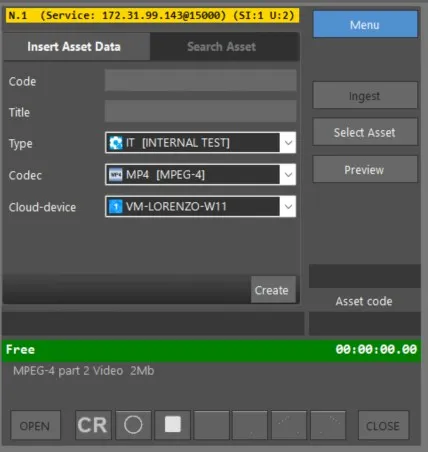 Ingest_Service_-_Menu_-_Insert_Asset_Data
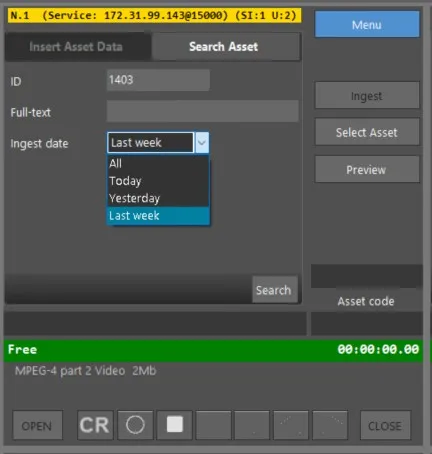 Ingest_Service_-_Menu_-_Search_Asset
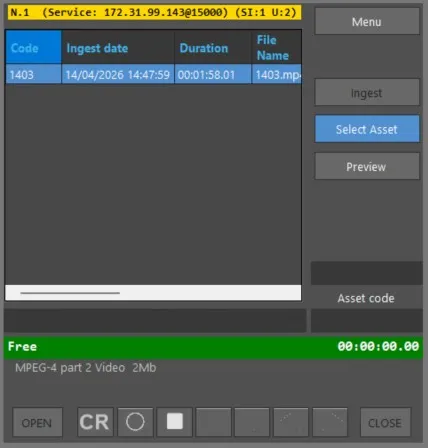 Ingest_Service_-_Select_Asset