1.3.4.3 Log Shipping
The SQL Server Log Shipping allows you to send the Transaction Log backups automatically from the primary Database in Primary Server to one or more secondary databases on separate Secondary Server instances. An optional third server instance, known as Monitor Server, can be configured to record the history and status of the backup and restore process and alert the user when the operations fail to occur according to schedules.
•Primary Server
The SQL Server instance in a Production environment.
•Primary Database
The Database in Primary Server consists of data you want to backup to another server, including SQL Server Management Studio, where all administration of log shipping configuration is performed.
•Secondary Server
The SQL Server instance served as a warm backup server for Primary Server.
•Secondary Database
The warm standby copy of the primary Database, usually for read-only access.
•Monitor Server
An optional instance of SQL Server to track all details of Log shipping.
The Benefits of Log Shipping
1. It provides a disaster recovery solution for a single primary database and one or more secondary database instances, each on a separate instance of SQL Server.
2. Supports limited "Read-only" access to secondary databases during the interval between restore jobs.
3. Between the backup of the log file in the primary Database in the Primary Server and restoring the log file in the Secondary Server, it allows a "user-specified delay" to take place for making significant changes to the Database.
4.Log Shipping requires minimum maintenance. If one of the steps fails, SQL Server picks up exactly where it left off and resumes the process.
Log Shipping Overview
1. Back up the Transaction Log from the Primary Server instance.
2. Copy the Transaction Log file to the Secondary Server instance and apply the log in the same order they were taken on the Primary Server.
3. Restore the Transaction Log file on the Secondary Server instance. The last Transaction Log backup should be restored using the "with recovery" clause to bring the Secondary Server to an operational state.
4. Transfer any logins on the Primary Server to the Secondary Server. The logins must be able to access the Log Shipping database.
The Transaction Log can be shipped to multiple secondary server instances. In such cases, steps 2 and 3 must be repeated on each secondary server instance.
A Log Shipping configuration does not failover automatically from Primary Server to Secondary Server; the Database Administrator must manually bring the Secondary Server online should the Primary Server become unavailable.
NB: Log Shipping requires substantial disk space for Transaction Log and is only compatible if the Database is set to "Full Recovery Mode".
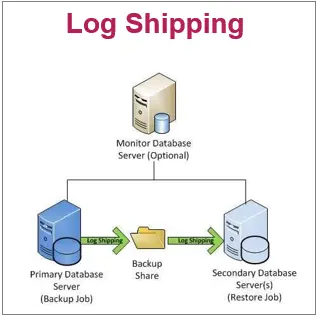 Log_Shipping