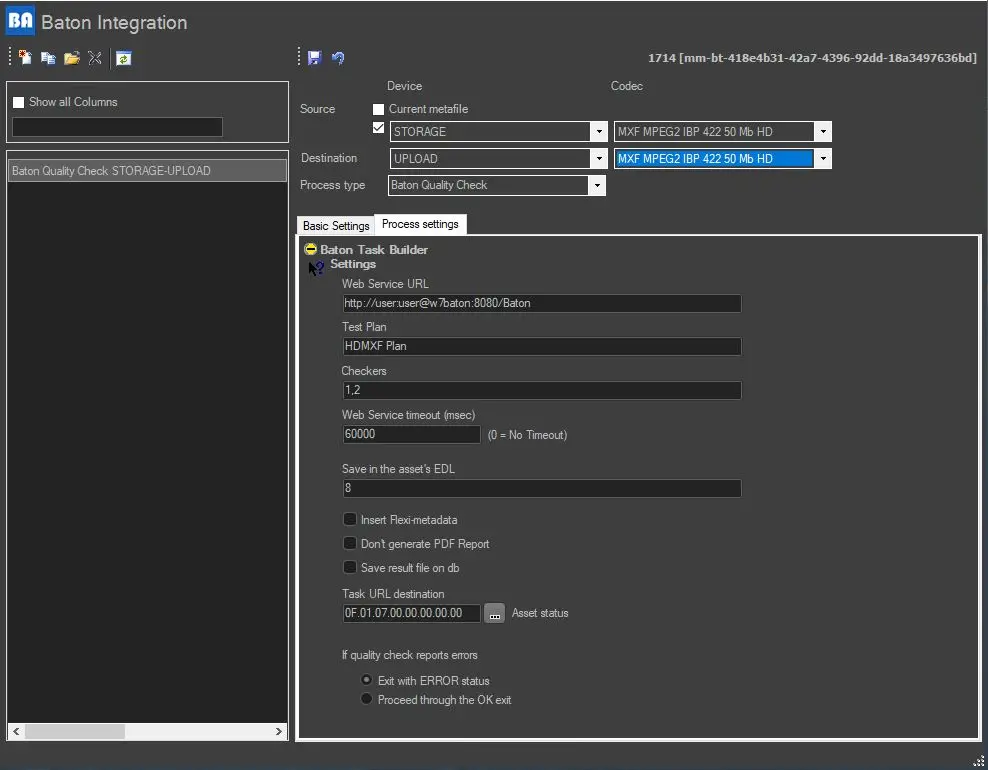
59.4.6.2 Process settings
Set here the following parameters to define how the action will be performed:
Settings
Web service URL: The URL on which the Baton web services are available (i.e. where test plans and tasks status are managed) must be specified in the following format:
http://username:password@BatonServer:port/Baton
For instance: http://user:user@w7baton:8080/Baton
Test plan: The Baton test plan is to be used to verify the media file. For instance: HDMXF Test Plan
NB: The test plan must be entered exactly as set in the Baton server (Planner/Test plans).
Checkers (mandatory, only for Baton enterprise edition): Comma-separated list of Checker Services (CS) indexes to be used to execute media analysis and verification tasks. Baton systems can have one or more CS running on either independent servers or the same server hosting the Verification Manager (VM). This application schedules files for verification on CS. For instance, to analyse and verify media using two checkers (1 and 2), specify: 1,2.
NB: The checkers must be entered exactly as set in the Baton server (Setup/Checkers).
Web service timeout (msec): Set a timeout value (in milliseconds) for the web service to receive a connection reply. Timeout is not applicable if the value is zero (0).
Save in the asset's EDL: Indicate the number of the EDL (default is 8) in which Baton results (i.e. detected segments issues) will be written. In the EDLs, the type of error would be written in the "Notes" field with the following severity level (with sample messages):
• Fatal: Invalid KLV key found
• Serious: Invalid Partition Pack found
Insert Flexi-metadata: If enabled, it allows inserting Flexi-metadata already compiled in the Media Library module.
Don't generate a PDF report: If enabled, the generation of the PDF report would be skipped. However, the PDF report can be viewed through the URL link defined in the "Task URL destination" field.
Save result file on DB: if enabled, any virtual documents uploaded to the workflow action would be saved into the database when saving the workflow action.
Task URL destination: This field stored the URL link to locate the PDF report. Use the [...] button to select the customised Flexi-metadata compiled in Media Library to input the URL destination into this field.
Note: Parameters support for integrating Etere T-workflow and Baton are based on the Etere.WF.Baton.exe executable.
If quality check reports error: Choose how the workflow action should behave in case the quality check returns error.
Depending on the success of the operation, the action will return one of the following results:
OK - The web service was connected, the file was found, and the verification was positive.
ERROR - The web server was not connected, the file was not found, or the verification was negative.
In case Baton determines that a file verification is negative, a message will be included in the asset's workflow log (Error: Result parsed file: This stream has "n" errors and "n" warnings).
 datamover_baton