59.4.7.7 For Conforming (EtConform.exe)
Actions based on the EtConform.exe executable allows conforming video segments.
Every time a conforming is requested, the EtConform executable determines the segments to be conformed with the following priority:
1.EDL Workflow (new asset) - If the target asset has segments on its EDL No. 77 (e.g. conformed from Media Library), the conforming is performed for the segments specified in that EDL version, based on the restore&conforming parameters of the Conforming Profile.
2.News Story Creator (same asset) - If target asset doesn't have an EDL No. 77 (e.g. conformed from News Story Creator), the conforming is performed for the segments specified in the XML containing the ETL playlist (and stored in the conforming directory), based on the restore&conforming parameters set in the News Story Creator. 3
3.EDL Workflow (same asset) - In case the asset doesn't have an EDL No.77 neither an XML file, segments are taken from the EDL specified in the action's EDL parameter, based on the conforming profile specified in the action's profile parameter.
Suggestion: For further details on the conforming process please refer to the "Conforming" section of the Configuration Editor chapter.
Creating a new action
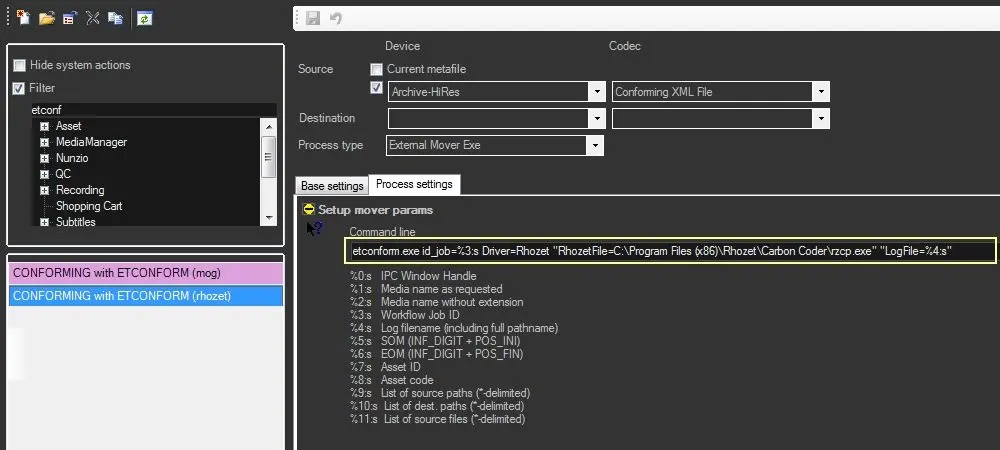
This action can be implemented by creating a new "datamover copy" action and compiling it as follows:
datamover_copy
In order to create this action you need to set the External Mover Exe action as follows:
Basic settings
DB Update - This option MUST be set to "never update db files" to prevent the T-workflow from updating the database as it will be EtConform.exe the one that will update conformed files into the database.
Devices and Codecs
Source device & codec: Set the device and codec of source files. Leave blank if conforming from News Story Creator or Media Library workflow¹.
Destination device & codec: Set the device and codec of source files. Leave blank if conforming from News Story Creator or Media Library workflow¹.
Process type: Indicates that the current action is a "External Mover Exe".
¹ : Source and Target parameters are taken from the Conforming Profile when conforming from Media Library workflow; and from NSC parameters when conforming from News Story Creator.
Process Settings
Command line: Define the executable (and its parameters) to be used for the conforming operation. Available executables include:
RHOZET-based Conforming
EtConform.exe id_job=%3:s Driver=Rhozet "RhozetFile=C:\Program Files (x86)\Rhozet\Carbon Coder\rzcp.exe" "Logfile=%4:s" "EDL=1" "Profile=Profile3"
id_job - Contains the Job's ID (e.g. '%3:s') provided by Etere Data Mover.
Driver - To perform a Rhozet-based conforming, indicate it here by entering: Driver=Rhozet
RhozetFile - Indicate the full path (i.e. path and name) of the rhozet engine (ie. rzcp.exe).
LogFile - The name and path of the process log file (e.g. '%4:s') provided by Etere Data Mover.
EDL - Specify the number of EDL to be conformed. NB: This parameter is optional. If set, the conforming will be performed in the same asset; if not set it will be used the EDL or XML specified by the T-workflow.
Profile - Specify the name of profile to be used for the conforming. NB: This parameter is optional. If set, the conforming will be performed in the same asset; if not set it will be used the conforming profile specified by the T-workflow.
NB: Carbon Coder must be installed (with a valid license) on the same Pc where Data Mover runs.
Etere Transcoding Action
Etconform.exe id_job=%3:s "LogFile=%4:s""EDL=1" "Profile=Profile3"
id_job - Contains the Job's ID (e.g. '%3:s') provided by Etere Data Mover.
LogFile - The name and path of the process log file (e.g. '%4:s') provided by Etere Data Mover.
EDL - Specify the number of EDL to be conformed. NB: This parameter is optional. If set, the conforming will be performed in the same asset; if not set, it will be used the EDL or XML specified by the T-workflow.
Profile - Specify the profile's name to be used for the conforming. NB: This parameter is optional. The conforming will be performed in the same asset; if not set, the conforming profile will be used as specified by the T-workflow.
VANTAGE-based Conforming
Etconform.exe "Driver=vantage" "netHost=172.31.230.98" "netport=8676" "LogFile=%4:s" ipchwnd=%0:d" "ipchwnd=%0:s" "id_job=%3:d"
id_job - Contains the Job's ID (e.g. '%3:d') provided by Etere Data Mover.
Driver - To perform a Vantage-based conforming, indicate it here by entering: Driver=vantage
LogFile - The name and path of the process log file (e.g. '%4:s') provided by Etere Data Mover.
EDL - Specify the number of EDL to be conformed. NB: This parameter is optional. If set, the conforming will be performed in the same asset; if it is not set, EDL or XML will be used as specified by the T-workflow.
Profile - Specify the name of profile to be used for the conforming. NB: This parameter is optional. If set, the conforming will be performed in the same asset; if not set the conforming profile will be used as specified by the T-workflow.
NetHost - Specify the NetHost to be used. E.g. 172.31.230.98.
Netport - Specify the Netpot to be used. E.g. 8676.
NB: Vantage must be installed, this a third party software telestream.
How to use it
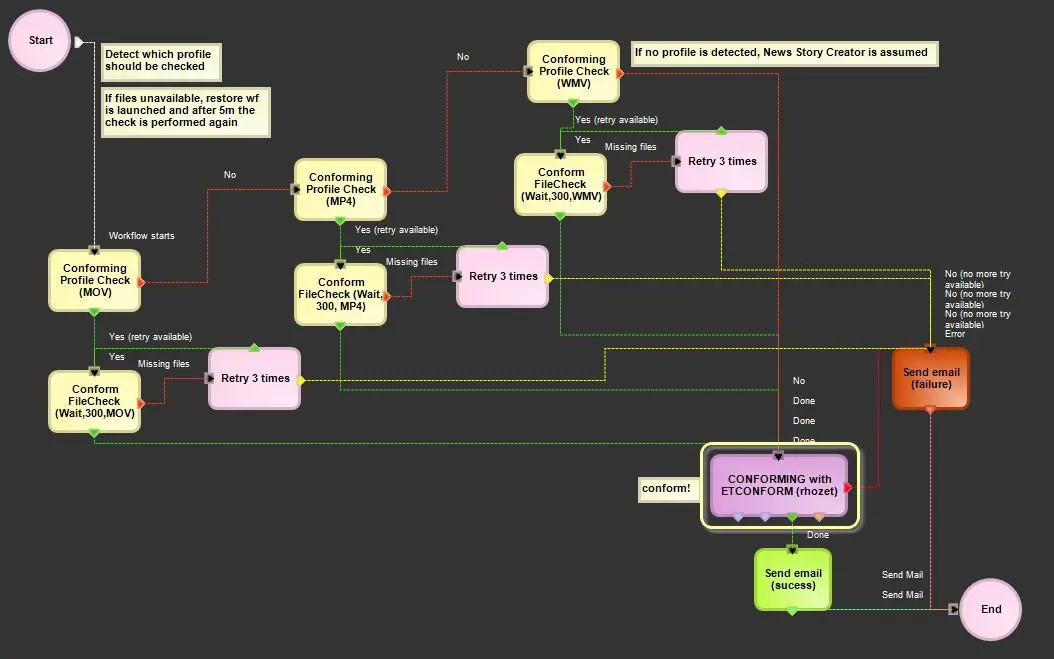
Use the T-Workflow Designer to implement a T-workflow to conform media files using the "EtConform.exe" application:
T-Workflow Designer1
Suggestion: As shown in the T-workflow above, you can create a default conforming workflow that can be used for conforming from both, Media Library and News Story Creator. In this way, if the T-workflow doesn't detect a preset profile (i.e. profile check) it will perform the conforming based on the XML.
 datamover_copy
 T-Workflow_Designer1