99 Etere CensorEx Live Censorship System
Introduction to CENSOR EX
CENSOR EX is Etere's live censorship and time delay application, designed to allow operators to monitor and modify live content before it is broadcast.
Built on the ETX platform and entirely developed using Etere's in-house technologies, CENSOR EX is the evolution of the previous CENSOR MX application (See chapter no.58), featuring a modern architecture that is fully integrated with the Etere ecosystem.
The application provides operators with the tools required to manage sensitive or non-compliant content in real time. Video segments can be replaced or removed, alternative clips can be inserted, and audio can be muted or bleeped, ensuring complete control over the outgoing signal during live operations.
CENSOR EX features a configurable user interface that can be adapted to different operational workflows. Layouts can be customized according to user preferences, and multi-monitor configurations allow the video preview and operational controls to be displayed separately, improving efficiency during live censorship tasks.
Its client/server architecture enables a single workstation to control one or multiple CENSOR EX servers while providing low-latency preview and reliable operation in broadcast environments.
Key Features
CENSOR EX provides a comprehensive set of tools for live censorship and time delay operations, including:
■ Variable time delay with dynamic compensation, allowing insertions and deletions without affecting the overall delay duration.
■ Real-time preview during recording with integrated countdown timers.
■ Fast deletion, insertion, and replacement of both live and recorded video content.
■ Audio muting and bleeping capabilities.
■ Low-latency preview for real-time monitoring.
■ Continuous playlist looping.
■ Fully customizable workspace and layouts.
■ Support for multiple image formats.
■ Real-time replacement or removal of sensitive or inappropriate content.
■ One-click emergency controls to instantly mute audio or cut the output to black.
■ Client/server architecture allowing a single client to control multiple CENSOR EX servers.
■ Timeline with markers displaying all editing operations, including logs and censorship reports.
■ Integrated media library for quick insertion of clips, including commercials and replacement content.
■ Configurable time delay with flexible buffer management.
■ Scalable architecture suitable for both SD and HD broadcast environments.
■ Customizable alert messages.
■ Enhanced live and delayed preview with countdown timers.
■ Targeted advertisement insertion for regional broadcasting.
■ Time zone compensation.
■ Multi-clip insertion support.
■ Bookmark management.
■ Main and backup server configuration.
■ Dual-monitor support and optional remote operation using external multimedia controllers.
User Interface
The CENSOR EX interface is designed to provide an efficient and customizable operating environment.
Key interface features include:
■ Flexible workspace layouts that can be adapted to different operational requirements.
■ Support for dual-monitor configurations.
■ Keyboard shortcuts and compatibility with multimedia controllers for faster operation.
■ Integrated clip library for replacement media and pre-recorded content.
■ Easy creation, management, and renaming of playlists.
■ Configurable time delay buffer monitoring.
■ Customizable alert messages with support for graphic files.
■ Visual indication of the latest editing point for quick operator reference.
Censorship Operations
CENSOR EX supports a wide range of censorship actions that can be applied in real time:
■ Insert, replace, delete, or hide video segments.
■ Apply audio mute or bleep.
■ Cut to mute to suppress on-air audio.
■ Cut to black to interrupt the outgoing video signal.
■ Apply multiple blur or mosaic effects with configurable intensity.
■ Use simultaneous blur and mosaic effects on multiple regions.
■ Configure fade and wipe transitions between edited segments.
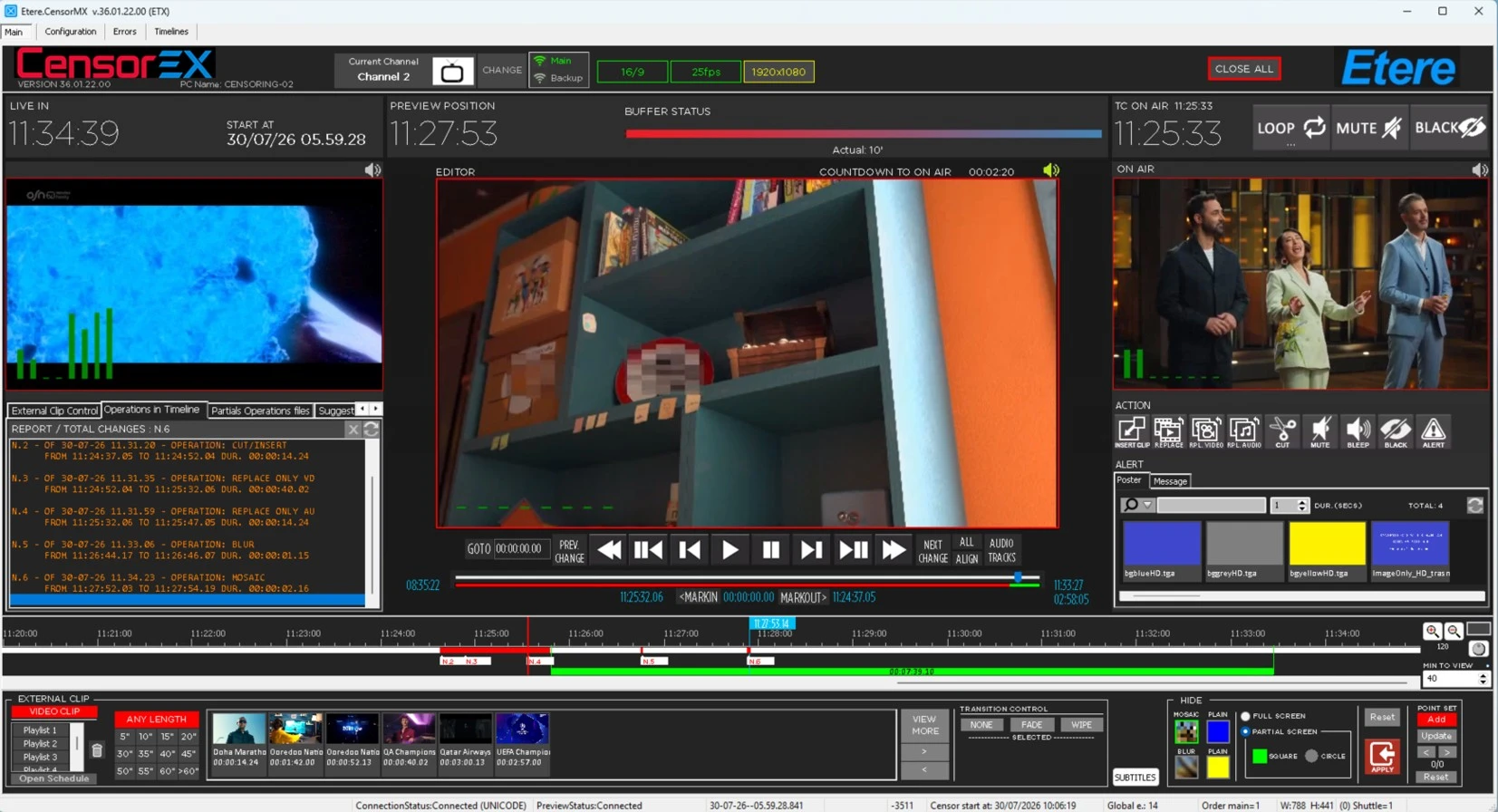 CensorEx