79.8.7 Master/Clone configuration
In order to implement redundancy and failover in case of emergency, in Nunzio ETX Playout has been introduced the master/clone configuration. You can set a Master Nunzio ETX Playout and a Clone Nunzio ETX Playout. The Clone will replicate all the actions on the rundown performed by the user on the Master.
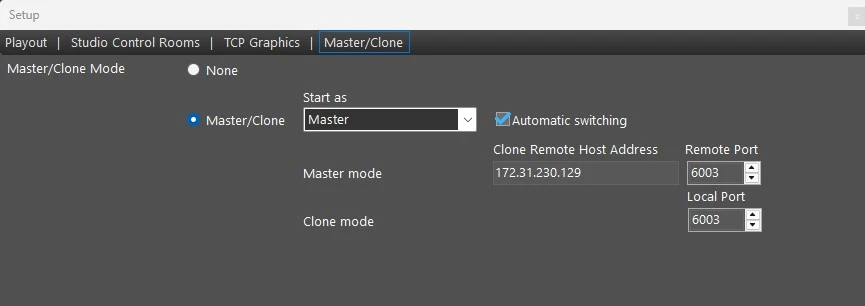
master_clone_setup
• Master/clone mode: If set to None, Nunzio Playout will run as the main airing module. If set to Master/Clone, the following parameters will be enabled, allowing to set a clone (or master) Nunzio ETX Playout to connect to. Additionally, on the main window, the Switch button will become visible.
• Start as: Select if the current Nunzio Playout instance should start as Master or Clone.
• Automatic switching: In case Nunzio ETX Playout clone gets disconnected from master, it switches automatically to master, enabling the buttons to control the rundown in order to be fully functional for airing. If a manual switch is needed, simply click the Switch button on the main section.
When it starts as Master, but it detects a Master already running on Remote Host (parameter "Clone remote host address"), then it switches to Clone;
When it is running as Clone and does not find a Master on Remote Host, then it switches to Master.
• Master mode: Set here the Clone Remote Host Address and Port to connect to, when it is in Master mode.
• Clone mode: Set here the Local Port used to receive commands from Master, when Nunzio ETX Playout is in Clone mode. The default port is 6003.
Once all the parameters are set, click the Save button to confirm the changes. A restart of the application will be required.
 master_clone_setup