99.1.2 Live Censorship Service
Live Censorship Service
The Etere Censor EX Live Censorship service is the core component responsible for managing the delayed media generated by the Time Delay Service.
Using the recorded media files, the service builds the censorship buffer, manages playback, and provides the video streams required by the CENSOR EX desktop application. It allows operators to review, edit, and approve content before it is transmitted on-air.
The service is configured through Etere Web, which automatically updates the local configuration file used by the service.
Installation
The Live Censorship service is installed through the Etere Update module. Each installed instance operates independently and can be configured separately. The configuration of each instance of the service will be inserted in the same XML.
Licensing
Each Live Censorship service instance requires one EA1239 license. The license must be assigned to the workstation where the service is installed. Since the Live Censorship service relies on the media generated by the Time Delay Service, both services are typically installed on the same workstation. For example, if two Live Censorship service instances are installed on the same machine, two **EA1239** licenses must be assigned to the corresponding Etere Resource.
Note → One EA1239 license is required for each installed service instance.
Configuration
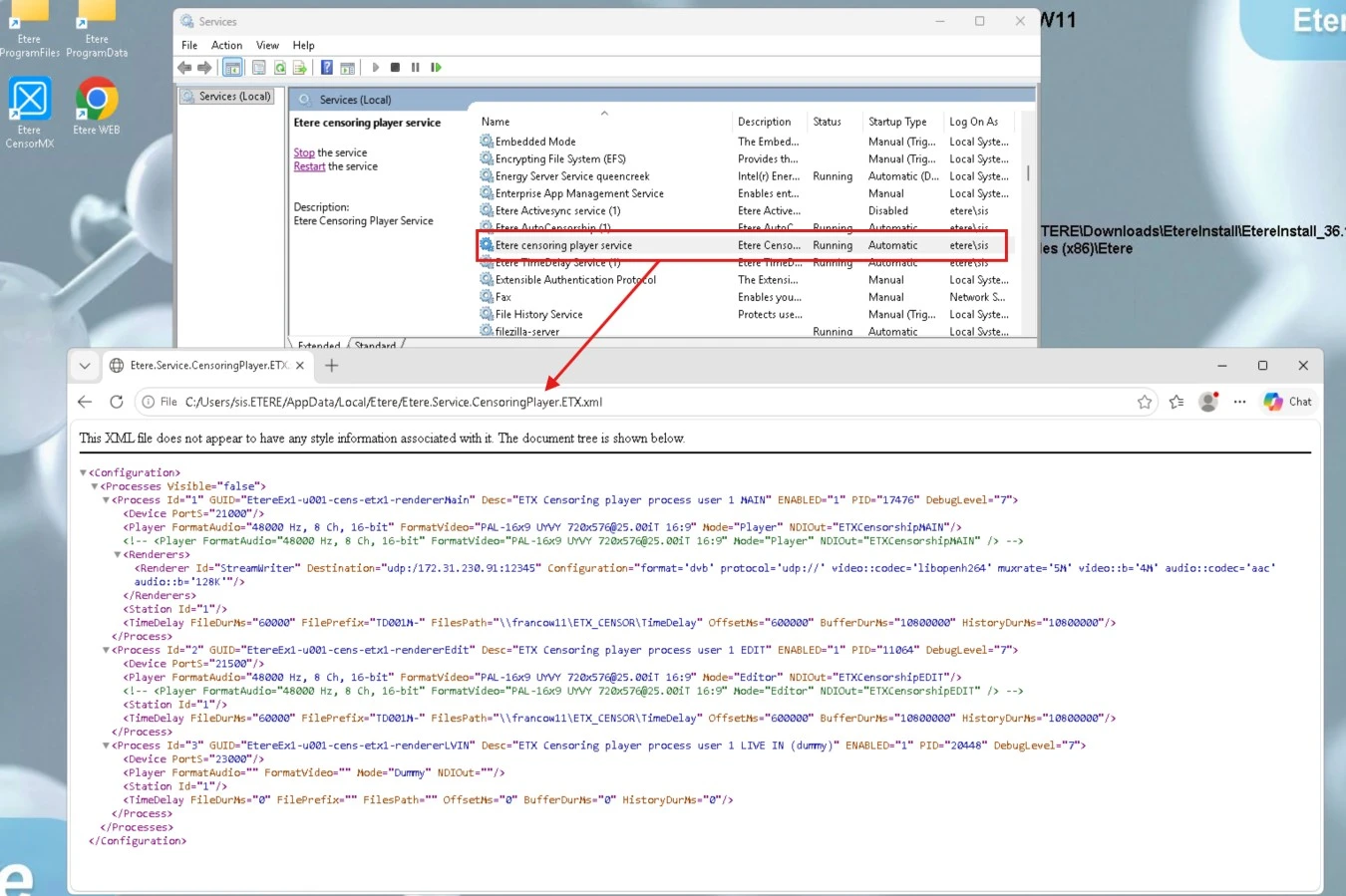
The service configuration is managed from Etere Web. When the configuration is applied, a local XML configuration file is automatically generated at: C:\Users\<user>.<domain>\AppData\Local\Etere\Etere.Service.CensoringPlayer.ETX.xml
This file is maintained by the system and should not be edited manually unless specifically required.
Configuration Parameters
The following parameters are available for each configured service instance.
Device Port: Communication port used by the service instance.
Player Defines the playback configuration used by the service.
Available parameters include:
Mode: Operating mode of the player (Player, Editor or Dummy).
Video Format: Output video format used by the player.
Audio Format: Output audio format.
NDI Output: Optional NDI output stream name.
Renderer: Defines the output renderer used by the service.
Destination: Output destination (for example UDP streaming).
Configuration: Rendering and encoding parameters used for the generated output stream.
Station ID: Associates the service instance with an Etere station.
Time Delay: Defines how the service accesses and manages the delayed media generated by the Time Delay Service.
Files Path: Folder containing the media files generated by the Time Delay Service.
File Prefix: Prefix used to identify the recorded media files.
File Duration: Duration of each media chunk.
Offset: Delay applied between the incoming live signal and the content available for censorship.
Buffer Duration: Maximum duration of the managed censorship buffer.
History Duratio: Amount of media history retained for editing and playback operations.
A Live Censorship service may include multiple internal processes, each performing a dedicated function.
Player: Generates the delayed output stream used for transmission.
Editor: Provides the media stream used by the CENSOR EX desktop application during censorship operations.
Dummy: Auxiliary process reserved for internal synchronization and service management.
Here an XML example:
<Configuration>
<Processes Visible="false">
<Process Id="1" GUID="EtereEx1-u001-cens-etx1-rendererMain" Desc="ETX Censoring player process user 1 MAIN" ENABLED="1" PID="17476" DebugLevel="7">
<Device PortS="21000"/>
<Player FormatAudio="48000 Hz, 8 Ch, 16-bit" FormatVideo="PAL-16x9 UYVY 720x576@25.00iT 16:9" Mode="Player" NDIOut="ETXCensorshipMAIN"/>
<Renderers>
<Renderer Id="StreamWriter" Destination="udp:/172.31.230.91:12345" Configuration="format='dvb' protocol='udp://' video::codec='libopenh264' muxrate='5M' video::b='4M' audio::codec='aac' audio::b='128K'"/>
</Renderers>
<Station Id="1"/>
<TimeDelay FileDurMs="60000" FilePrefix="TD001M-" FilesPath="\\francow11\ETX_CENSOR\TimeDelay" OffsetMs="600000" BufferDurMs="10800000" HistoryDurMs="10800000"/>
</Process>
<Process Id="2" GUID="EtereEx1-u001-cens-etx1-rendererEdit" Desc="ETX Censoring player process user 1 EDIT" ENABLED="1" PID="11064" DebugLevel="7">
<Device PortS="21500"/>
<Player FormatAudio="48000 Hz, 8 Ch, 16-bit" FormatVideo="PAL-16x9 UYVY 720x576@25.00iT 16:9" Mode="Editor" NDIOut="ETXCensorshipEDIT"/>
<Station Id="1"/>
<TimeDelay FileDurMs="60000" FilePrefix="TD001M-" FilesPath="\\francow11\ETX_CENSOR\TimeDelay" OffsetMs="600000" BufferDurMs="10800000" HistoryDurMs="10800000"/>
</Process>
<Process Id="3" GUID="EtereEx1-u001-cens-etx1-rendererLVIN" Desc="ETX Censoring player process user 1 LIVE IN (dummy)" ENABLED="1" PID="20448" DebugLevel="7">
<Device PortS="23000"/>
<Player FormatAudio="" FormatVideo="" Mode="Dummy" NDIOut=""/>
<Station Id="1"/>
<TimeDelay FileDurMs="0" FilePrefix="" FilesPath="" OffsetMs="0" BufferDurMs="0" HistoryDurMs="0"/>
</Process>
</Processes>
</Configuration>
Once the service configuration is completed through Etere Web, the generated XML configuration enables the creation of the required output streams.
By default, the Live Censorship service generates two NDI streams:
MAIN stream: Used for the final censored output and intended for the on-air workflow.
EDIT stream: Used by the CENSOR EX client application to perform monitoring and censorship operations.
Additional output streams can also be configured according to operational requirements. For example, an extra DVB stream can be generated and sent to a specific destination using the configured renderer settings.
The Windows user account running the service must have **Administrator privileges** to ensure correct operation and avoid permission-related issues during service execution.
 XML_CensoringService