99.1.3 Etere AutoCensor
The Etere AutoCensor service is the AI-based analysis component of the CENSOR EX system. Its purpose is to analyze the media generated by the Time Delay Service and identify potentially sensitive or inappropriate content according to predefined detection criteria.
The service processes the video frames extracted from the delayed media, evaluates them using the configured AI detection parameters, and generates censorship suggestions. These suggestions are then made available to the CENSOR EX desktop application, where operators can review them directly on the timeline and decide whether to apply or ignore the proposed censorship actions.
Installation
The AutoCensor service is installed through the Etere Update module.
During installation, the service is registered on the workstation and becomes available for configuration through Etere Web.
Licensing
The AutoCensor service requires one dedicated EA1299 license for each installed service instance. The license must be assigned to the workstation where the AutoCensor service is running.
Note → One EA1299 license corresponds to one AutoCensor service instance.
Configuration
The AutoCensor configuration is managed through Etere Web.
Once the parameters are saved, the configuration values are stored in the Etere database. The AutoCensor service reads the configuration directly from the database during operation.
The main configuration parameters are divided into general service settings and AI detection thresholds.
General Settings
The following parameters control the service behavior:
Refresh Time: Defines the interval used by the service to refresh its analysis status.
Log File Size: Defines the maximum size of each generated log file.
Log File Number: Defines the maximum number of retained service log files.
Job Log File Number: Defines the maximum number of retained analysis job logs.
Images Path Repository: Defines the repository containing the media files to be analyzed.
Tracking Tolerance: Defines the tolerance value used for object tracking between analyzed frames.
Frames Step: Defines the frame interval used during analysis.
Minimum Samples: Defines the minimum number of samples required for detection.
Detection Lifetime Minutes: Defines how long a generated detection remains valid.
Default Score Minimum: Defines the default confidence threshold required to generate a detection.
Ready Delay Seconds (default: 10): Defines how many seconds the service waits after the expected end of a Time Delay video segment before considering the media ready for analysis. The expected end time is calculated from the timestamp contained in the file name and the expected segment duration.
Resume Look-Back Minutes (default: 5): Defines the maximum age of the saved processing state that can be reused after the service is restarted. If the saved state file is newer than the configured value, the service resumes processing from the last completed media file and restores the previously saved censorship areas. Otherwise, the saved state is ignored and the service starts a new analysis from the beginning.
Detection Parameters
AutoCensor uses configurable confidence thresholds for each supported detection category. Each detection class has an associated minimum score value that determines when the AI analysis should generate a censorship suggestion.
Examples of configurable detection categories include:
• Exposed or covered body areas.
• Facial detection categories.
• Gender-related facial classification.
• Sensitive body areas.
• Other AI-supported visual detection classes.
The confidence score allows administrators to adjust the sensitivity of the analysis according to operational requirements.
Analysis Workflow
During operation, AutoCensor continuously analyzes the media files generated by the Time Delay Service.
The service:
1. Retrieves the delayed media available in the configured repository.
2. Extracts and analyzes video frames according to the configured parameters.
3. Detects potentially sensitive content based on the enabled AI detection classes.
4. Generates suggested censorship areas with the corresponding confidence score.
5. Sends the generated suggestions to the CENSOR EX desktop application.
Within the desktop application, detected areas are displayed on the timeline, allowing the operator to review each suggestion and decide whether to apply the censorship action or continue without modification.
AutoCensor acts as an assistance tool for operators, improving reaction time and workflow efficiency while keeping the final censorship decision under manual control from the CensorEx desktop application.
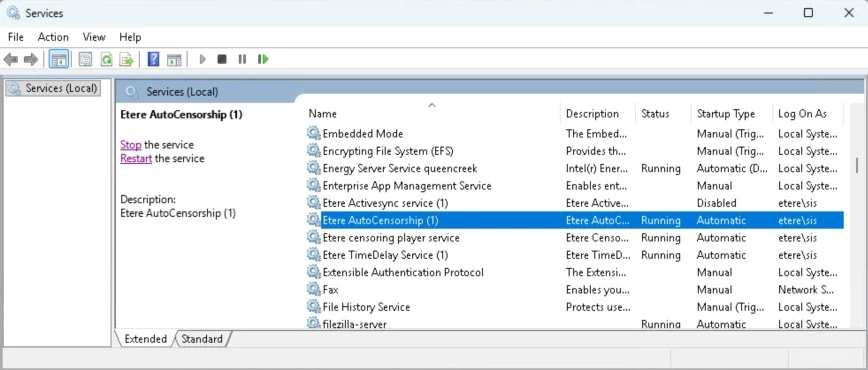 AutoCensorService
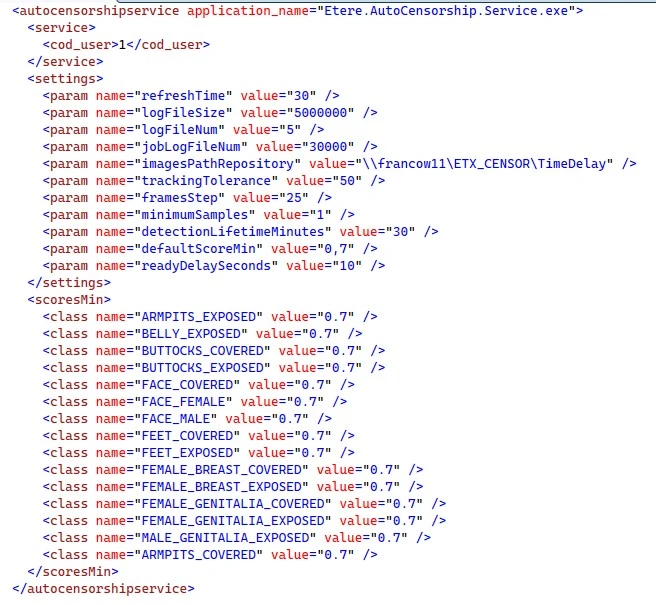 AutoCensor_SQLConfiguration